
Office 365 Backup Tool
ENTERPRISE CLOUD BACKUP & MIGRATOROffice 365 Backup Tool
Enterprise Microsoft 365 backup software to archive Exchange Online mailboxes, Shared Mailboxes, and In-Place Archives to PST, PDF, MBOX, and EML. Windows 11 & Apple Silicon M4.
- Backup Microsoft 365 / Office 365 mailboxes to 17 formats: PST, PDF, MBOX, EML, MSG, HTML, CSV, JSON, Gmail, IMAP
- Supports Primary Inboxes, Departmental Shared Mailboxes, and In-Place Online Archives
- Microsoft 365 Global Admin Impersonation via Microsoft Graph API and Exchange Web Services (EWS)
- Modern OAuth 2.0 PKCE authentication — zero plain-text password exposure
- Incremental backup mode — archives only new or modified emails since the previous session
- Backs up complete Contacts, Calendar events, and Tasks to local storage
30-Day Guarantee
100% money back risk-free
Instant Key Delivery
Automated email licensing
256-Bit SSL Checkout
Stripe & PayPal certified
24/7 Tech Support
Expert migration help
Designed for Seamless Data Migration
Office 365 Backup Tool — Exchange Online Archiver (v26.08, 2026 Edition)
Microsoft 365 operates on a shared responsibility model: Microsoft guarantees infrastructure availability, but data loss caused by accidental deletion, ransomware, or departing employees is the customer's responsibility.
Prism Office 365 Backup Tool downloads tenant mailboxes to local offline storage in PST, PDF, and 15 other formats.
What It Actually Does
The engine streams mailboxes directly from Microsoft Graph API and Exchange Web Services (EWS), exporting complete inboxes, attachments, contacts, and calendar schedules to local drives or secondary cloud backups.
17 output targets supported:
PST (Unicode) · PDF · HTML · MHTML · RTF · DOC · TXT · JSON · CSV · EML · MSG · MBOX · EMLX · Google Workspace · Gmail · IMAP Server · Local Hard Drive
Enterprise & Admin Features
- Microsoft 365 Global Admin Impersonation — back up hundreds of employee accounts, shared mailboxes, and In-Place Archives from one central admin login.
- Incremental Backup Engine — downloads only new items received since the last backup run.
- Headless CLI Mode — run scheduled automated cron backups via JSON config with RFC 4180 CSV logs.
- Interrupted Migration Resume Center — checkpoint every message in SQLite for uninterrupted large tenant backups.
Universal Compatibility
Native Apple Silicon (M1-M4) & Windows 11/10 64-bit performance.
How It Works: Interactive Application Studio
Explore the authentic 6-step desktop interface below. Click any step to inspect its live screen, features, and migration capabilities:
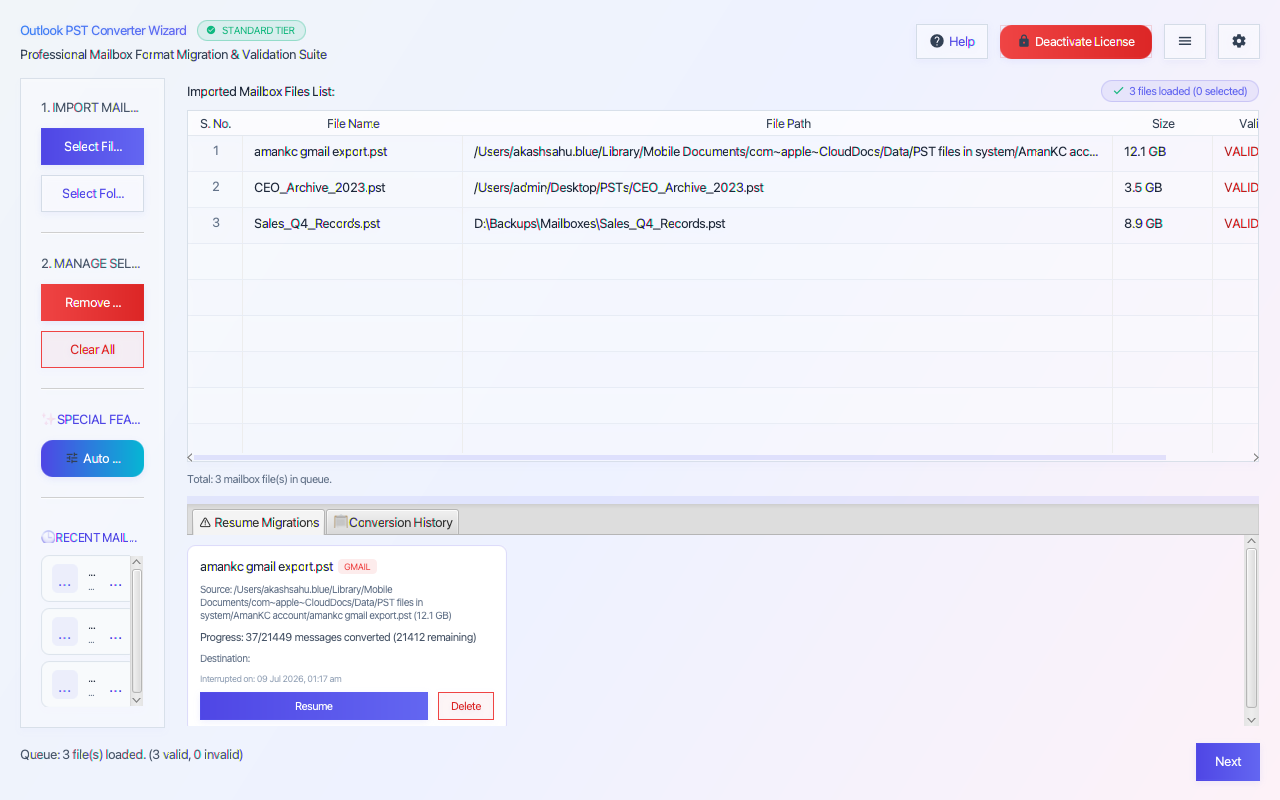 STEP 01
 Import & Queue Office 365 Files
Add individual Office 365 files or entire folder trees using Add Files or Add Folder. The engine auto-validates binary headers and queues items in the file list. The Session Resume Center allows resuming previously interrupted migration jobs without duplicate processing.
Engine Core Features & Capabilities
Built for enterprise-grade data migrations with 100% byte-exact integrity preservation across all folder trees.
Standalone PST Engine
Backup Microsoft 365 / Office 365 mailboxes to 17 formats: PST, PDF, MBOX, EML, MSG, HTML, CSV, JSON, Gmail, IMAP
Auto-Detect & Batch Queue
Supports Primary Inboxes, Departmental Shared Mailboxes, and In-Place Online Archives
Lazy-Loaded Tree Explorer
Microsoft 365 Global Admin Impersonation via Microsoft Graph API and Exchange Web Services (EWS)
7-Category Data Hygiene
Modern OAuth 2.0 PKCE authentication — zero plain-text password exposure
SHA-256 Deduplication
Incremental backup mode — archives only new or modified emails since the previous session
17 Output Destinations
Backs up complete Contacts, Calendar events, and Tasks to local storage
OAuth 2.0 Cloud Migration
Preserves full folder tree, inline images, attachments, To/From/CC/BCC, and read/unread flags
Multi-Threaded Execution
Admin User Mapping CSV loader — map hundreds of Microsoft 365 mailboxes for bulk backup
SHA-256 PDF Audit Reports
Headless CLI mode — automated batch backups via JSON config with RFC 4180 CSV audit logs
Engine Capability #10
Interrupted Migration Resume Center — SQLite checkpointing ensures seamless resume after stops
Engine Capability #11
Multi-threaded Producer-Consumer parallel engine for high-speed mailbox downloading
Engine Capability #12
Advanced filtering: date range, sender/recipient lists, keyword search, and item types
Engine Capability #13
Split output PST files into 2GB, 5GB, or 10GB chunks for safe Outlook storage
Engine Capability #14
PDF Audit Report generated automatically upon backup completion
Engine Capability #15
Email completion notification via SMTP for overnight backup schedules
Engine Capability #16
Apple Silicon M1/M2/M3/M4 Universal Binary macOS build — zero Rosetta overhead
Supported Migration Formats
Source Input Formats
Converts data FROM these mailbox files
Microsoft 365 Enterprise Sync
Supported Source Mailbox Format
Supported Source Mailbox Format
Supported Source Mailbox Format
Target Destinations & Services
Exports data TO these target formats or cloud accounts
Microsoft Outlook Archive
Thunderbird & Mac Mailbox
Standard Email File (RFC 822)
Adobe Document with Attachments
Responsive HTML5 Web Page
Single Outlook Item File
Calculate Time & Cost Savings
See how much IT time and budget you save using our JVM-powered high-throughput conversion engine compared to legacy manual methods.
Business License
Includes Unlimited Conversion & Free Updates
Choose Your License Plan
Personal License
For single user Microsoft 365 mailbox backup
One-time payment
Save $30 (38% off)- Backup 1 Microsoft 365 Account
- All Output Formats (PST, MBOX, EML, PDF)
- Lifetime License & Updates
- 24/7 Email Support
Frequently Asked Questions
Why is a third-party backup necessary for Microsoft 365?
Microsoft 365's native retention policies do not protect against permanent accidental deletions, malicious admin actions, or ransomware. An offline PST backup provides complete business continuity.
Can I back up Microsoft 365 Shared Mailboxes?
Yes. You can target primary mailboxes, shared departmental mailboxes, and In-Place Online Archives directly.
Does it support incremental backups?
Yes. Incremental backup mode only downloads new emails, contacts, or calendar events received since the last backup run.
Does this work on Apple Silicon Macs?
Yes. Native ARM binaries run on Apple Silicon M1, M2, M3, and M4 Macs as well as Windows.
Can I automate daily/weekly backups via command line scripts?
Yes. Headless CLI mode allows running scheduled cron backups via JSON configuration files with RFC 4180 audit logs.
Can I back up user mailboxes before offboarding a departing employee?
Yes. Use Global Admin credentials to export the departing employee's Primary Mailbox and In-Place Online Archive to an offline PST file before cancelling their Microsoft 365 license.
Does this tool require a Microsoft Purview eDiscovery license?
No. The engine connects directly via Microsoft Graph API and Exchange Web Services (EWS) endpoints, archiving data locally without requiring premium Microsoft Purview subscriptions.
Verified Technical Feedback
“Finally a backup solution that covers all O365 services including Online Archives. Modern Azure login was smooth.”
Emma Thompson
CTO · StartupHub
“Saved us from a ransomware lockout. Restored 3 years of Microsoft 365 emails to PST in 20 minutes!”
David Kim
IT Manager · CloudOps
“The SHA-256 forensic audit report passed our SOC2 compliance requirements. Exceptional speed.”
Robert Vance
Infrastructure Architect · Aegis Security
Technical Documentation & Resource Suite for Office 365 Backup Tool
Explore dedicated sub-pages for 24 core capabilities, 6-step user manuals, benchmark throughputs, FAQs, and version changelogs.
Related Migration Software
PST to Gmail Migration Tool (2026 Enterprise Edition)
Directly migrate Outlook PST and OST files to Gmail and Google Workspace using modern OAuth 2.0 with zero password exposure. Windows 11 & Apple Silicon M4.
- ✓Directly migrate Outlook PST and OST files to personal Gmail and Google Workspace accounts
- ✓Modern OAuth 2.0 PKCE authentication — zero plain-text password storage
Gmail Backup Tool
Download and backup Gmail & Google Workspace emails, attachments, contacts, and calendars to PST, PDF, MBOX, EML, and Office 365 without Google Takeout 50GB limits. Windows 11 & Apple Silicon M4.
- ✓Backup Gmail and Google Workspace accounts to 17 formats: PST, PDF, MBOX, EML, MSG, HTML, CSV, JSON, Office 365, IMAP
- ✓Bypasses Google Takeout delays and 50GB archive limits with high-speed direct API streaming
OST Recovery Tool
Enterprise OST recovery software to repair corrupted, damaged, and orphaned Outlook OST files and restore emails, attachments, contacts, and calendars to PST, PDF, Office 365, and Gmail.
- ✓Deep forensic recovery of corrupted, damaged, inaccessible, and orphaned Outlook OST files
- ✓Restores emails, attachments, folder trees, contacts, calendars, tasks, and notes
Office 365 Backup Tool